GA4's AI Assistant Channel: How It Works and What It Tracks

Google announced an AI Assistant channel for the GA4 Default Channel Group in May 2026, and properties began seeing data between mid-May and early June. It separates traffic from recognized AI chatbots — ChatGPT, Gemini, and Claude among them — out of the Referral channel automatically, with no configuration required and no notification inside the GA4 interface.
The channel replaces the custom channel groups many teams built to measure AI referral traffic, and it changes how three traffic-source dimensions are populated. This guide covers how the channel works, where to find it, which sources it actually recognizes, why Google implemented it, what it still misses, and how to add it to a custom channel group.
TL;DR — The GA4 AI Assistant channel automatically classifies traffic from recognized AI chatbots by setting the medium to ai-assistant, with no configuration required. It only captures sessions carrying a referrer header, and it is not retroactive — traffic from before your property's rollout date stays in Referral. It was also added to the Default Channel Group only, so if you report from a custom channel group you have to add the channel yourself.
In This Guide
1. How the AI Assistant Channel Works
The AI Assistant channel is a default channel group in Google Analytics 4 that isolates traffic arriving from recognized AI chatbots. When GA4 detects an inbound referrer that matches a recognized AI assistant, it writes three dimension values at once rather than just bucketing the session.
| Dimension | Value GA4 assigns |
|---|---|
| Medium | ai-assistant |
| Campaign | (ai-assistant) — a reserved label |
| Default Channel Group | AI Assistant |
The source dimension keeps the actual referring domain, so you can still separate chatgpt.com from gemini.google.com inside the channel. That combination — a shared medium with a preserved source — is what lets you report on AI traffic as one channel while still breaking out which assistant sent it.
All three assignments happen automatically during processing. There is nothing to enable and no editor-level access required, which is a meaningful difference from the workaround it replaces.
(ai-assistant) into the campaign dimension, these sessions will show a campaign name you never created. If you have Looker Studio reports or BigQuery queries that filter or group on campaign, they'll now encounter a value that isn't in your naming convention.
2. Where to See It in GA4
The channel appears anywhere the Default Channel Group dimension is available, which is most of the acquisition reporting surface.
- Reports → Acquisition → Traffic acquisition. The default primary dimension is Session default channel group. AI Assistant will appear as its own row alongside Organic Search, Paid Search, and Referral.
- Reports → Acquisition → User acquisition. Same channel, scoped to first user acquisition rather than session — useful for understanding whether AI assistants are introducing new users or being used by people who already know you.
- Explore → Free form. Add Session default channel group as a dimension and Session source as a breakdown to see which specific assistants are driving the channel.
- Advertising → Attribution → Conversion paths. AI Assistant now appears as a distinct touchpoint in multi-touch paths instead of blending into Referral.
To see which assistants GA4 is actually recognizing in your property, switch the primary dimension in Traffic acquisition from Session default channel group to Session source / medium and look for anything paired with / ai-assistant. That list is the practical answer to "which AI sources does this cover for me" — more reliable than any published list, because it reflects your own data.
3. What Sources It Accounts For
Google names ChatGPT, Gemini, and Claude as examples in its Help Center documentation but has not published the full list of recognized AI assistant referrers. The channel definition page has not been updated with a complete technical definition either.
The reliable way to answer the question is to look at live data. Breaking the channel down by Session source / medium shows exactly which referrers GA4 is recognizing, and the list is broader than the three Google names:
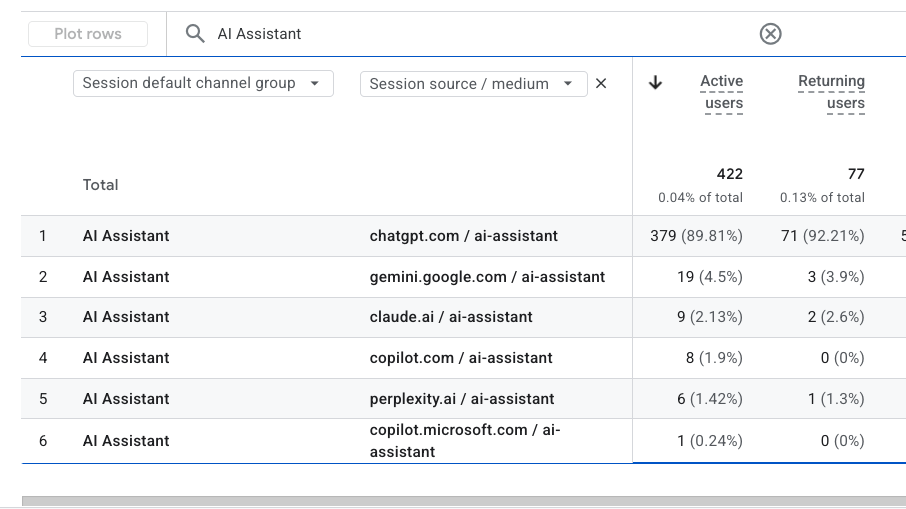
ai-assistant medium.| Source | Assistant | Share of channel |
|---|---|---|
chatgpt.com | ChatGPT | 89.81% |
gemini.google.com | Gemini | 4.50% |
claude.ai | Claude | 2.13% |
copilot.com | Microsoft Copilot | 1.90% |
perplexity.ai | Perplexity | 1.42% |
copilot.microsoft.com | Microsoft Copilot | 0.24% |
Two things are worth noting. Microsoft Copilot and Perplexity are recognized, even though Google's Help Center does not name them — they appeared only in earlier guidance about building custom channel groups. And Copilot arrives under two separate domains, copilot.com and copilot.microsoft.com, which are reported as distinct sources rather than consolidated.
The distribution is also instructive. ChatGPT accounted for roughly 90% of AI assistant sessions in this property, with every other assistant in low single digits. Percentages will vary by audience, but the general shape holds across most accounts, which means the channel is largely a ChatGPT measurement in practice.
4. Why Google Implemented It
Google's stated reason is that the channel lets you "monitor how generative AI impacts your business by tracking user clicks, trending AI sources, and how this traffic compares to traditional channels like organic search." That's the official framing, and the comparison to organic search is the part that reveals the intent.
The more useful explanation is that the workaround had become untenable. Before this update, isolating AI traffic meant building a custom channel group with regex patterns, and that carried three real costs:
- Manual maintenance. Regex patterns had to be updated by hand every time an AI platform changed or added a domain.
- Access requirements. Setting up a custom channel group requires editor-level permissions, which put it out of reach for many of the analysts who needed the data.
- A hard slot limit. GA4 allows only two custom channel groups per property. Spending one of them on AI tracking meant not spending it on something else.
There's also precedent. Google did the same thing in 2022 when it added the Cross-network channel to capture Performance Max and Smart Shopping traffic — a campaign type that didn't fit existing definitions got promoted out of a generic bucket into a dedicated channel without requiring configuration. AI assistants got the same treatment for the same reason: enough volume, and enough strategic relevance, that leaving it in Referral stopped being defensible.
Run the Free GA4 UTM Audit
Seven diagnostics against your own GA4 data — including where your campaign parameters are being dropped or overwritten. No signup, no account access required.
Launch Free Audit →5. What the Channel Still Misses
Two limitations affect how the channel's numbers should be interpreted.
Sessions without a referrer are not classified. The AI Assistant channel only captures sessions where a referrer header reaches your site. Clicks from in-app browsers, mobile apps, and copy-pasted links arrive without one and continue to land in Direct. This is the same structural gap that has always made AI traffic difficult to size, and the channel does not close it — it classifies the sessions that were already identifiable.
The change is not retroactive. GA4 processes data daily and does not reprocess historical sessions. Traffic before the channel went live remains classified as Referral. Any year-over-year comparison spanning that date will show Referral declining and AI Assistant appearing from zero, neither of which reflects a change in user behavior.
The discontinuity is unmistakable in a report that spans the rollout — a flat line at zero, then a step change on the day the channel began populating:
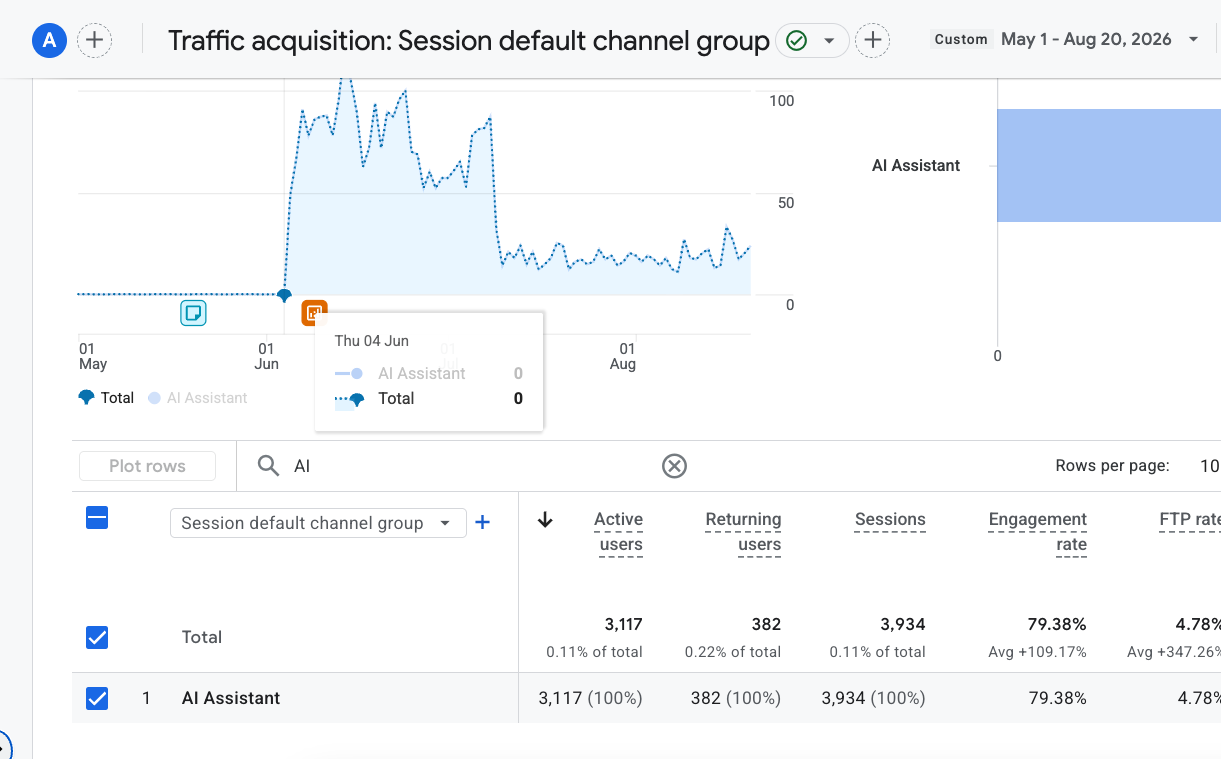
Rollout was staged rather than simultaneous. Google announced the channel in mid-May 2026, and properties began populating it anywhere from then through early June — the example above starts in early June. Find your own first non-zero day rather than assuming a date, because that is the point your reporting actually changes.
Annotate that date in your reporting tools. Everything to the left of it is a measurement artifact, not a trend.
Taken together, these limitations mean the AI Assistant channel represents a floor rather than a total. Actual AI-referred traffic is higher than the channel reports, by a margin that cannot be measured precisely.
6. Adding It to Your Custom Channel Groups
Google added the AI Assistant channel to the Default Channel Group only. Custom channel groups are independent rule sets, and existing ones were not updated. Any custom channel group built before the rollout still classifies AI assistant traffic using its original rules — normally into Referral, or into whatever catch-all channel sits at the bottom of the list.
This matters more than it first appears, because teams that built a custom channel group generally report from it rather than from the default. If your Looker Studio dashboards, Explorations, or standard reports are set to a custom group, the AI Assistant channel will not appear in them at all until you add it yourself.
How to add the channel manually
- Open Admin → Data display → Channel groups. Editor access on the property is required.
- Open the custom channel group you report from and select Edit. The Default Channel Group itself cannot be edited, though it can be cloned as a starting point.
- Click Add new channel and name it
AI Assistants. - Set a single condition:
Default channel group→ matches exactly (=) →AI Assistants. - Save channel. Changes take effect on the next report refresh.
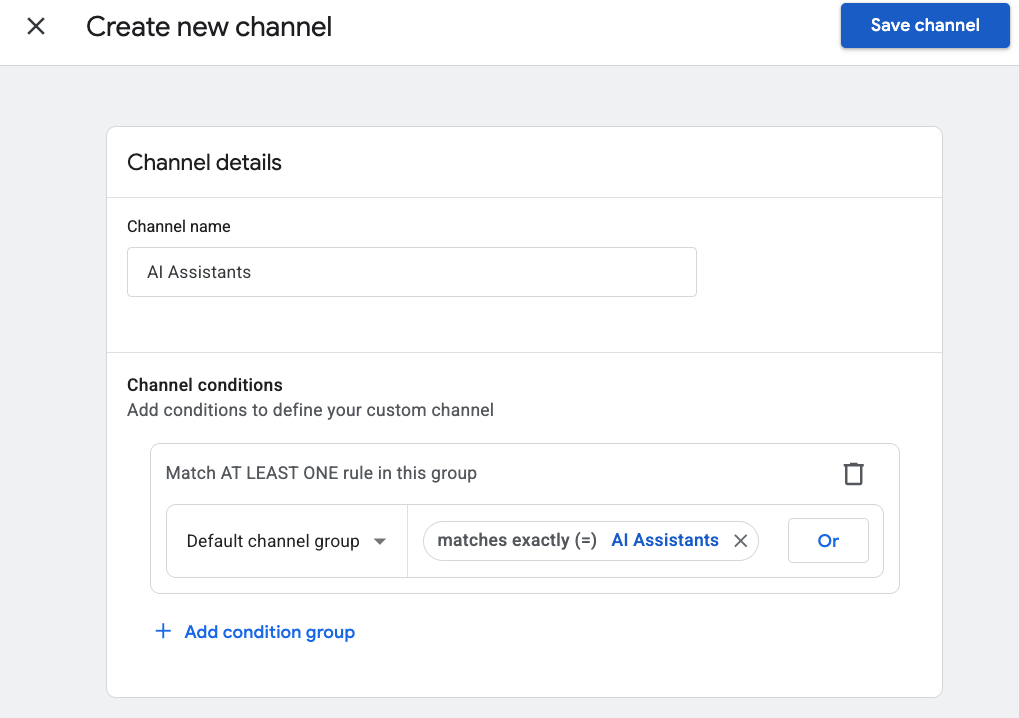
Matching on Default channel group rather than rebuilding the rule from source and medium values is the important detail. It inherits Google's recognition logic directly, so any assistant Google adds to the list later is picked up automatically with no maintenance on your part. Writing your own Session medium equals ai-assistant rule produces the same result today, but it duplicates logic you would then own forever.
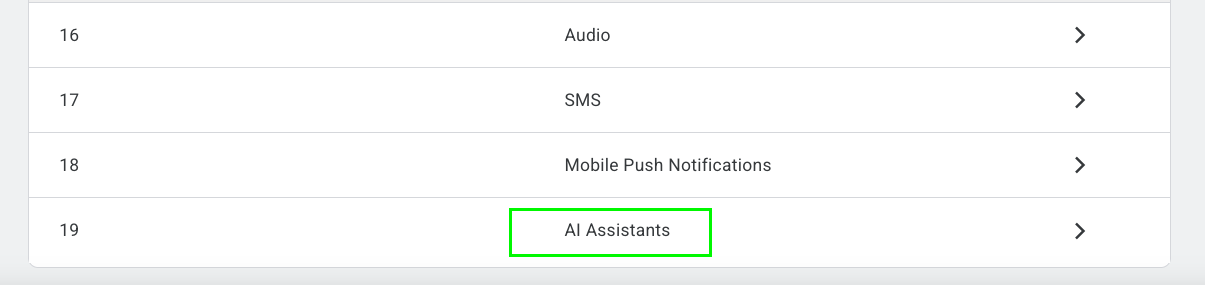
Once saved, the channel appears in the group's channel list alongside every other rule:
7. Keeping the Rest of Your Channels Accurate
The AI Assistant channel is one of roughly twenty channels in the GA4 Default Channel Group, and it is unusual in that Google populates it for you. Every other channel — Paid Search, Paid Social, Email, Display, Affiliates — is assigned from the utm_source and utm_medium values on the links your team builds. Those channels are only as accurate as the tagging behind them.
That is the part no platform update fixes. A campaign tagged utm_medium=ads instead of cpc lands in Unassigned. A source written Facebook in one campaign and facebook in another creates two dimension values that can never be merged. The errors are silent, and GA4 gives no warning when they happen.
UTM Buddy is a campaign URL builder designed to catch those problems before a link is published:
- GA4 attribution preview — see the exact default channel group a URL will land in before you publish it, so a wrong medium never reaches production.
- Spell check and validation — flags misspellings and casing inconsistencies that would otherwise create permanent duplicate dimension values.
- Saved parameter templates — lock source and medium per platform so every campaign inherits the same convention.
- Bulk URL builder — generate dozens of correctly structured URLs from a template rather than copy-pasting one at a time.
- Team workspaces — keep naming conventions consistent across brands, clients, and contributors.
- All nine UTM parameters — including
utm_id,utm_source_platform,utm_marketing_tactic, andutm_creative_format.
Paid AI placements are the clearest example. An untagged ad click from inside ChatGPT arrives with a recognized referrer and no campaign parameters, so GA4 files it in the AI Assistants channel alongside organic referrals — in a bucket that carries no cost data. Our guide to Paid AI tracking for OpenAI Ads walks through the tagging and the two channel-group edits that separate paid clicks from organic ones.
Google handled the AI referral problem for you. The other nineteen channels are still yours to get right.
Frequently Asked Questions
The AI Assistant channel is a default channel group in Google Analytics 4 that isolates traffic arriving from recognized AI chatbots. When GA4 detects a referrer matching a recognized AI assistant, it assigns a medium of ai-assistant, a campaign value of (ai-assistant), and groups the session under the AI Assistant channel. It rolled out to properties between mid-May and early June 2026 and requires no configuration.
Google names only ChatGPT, Gemini, and Claude in its documentation, but live data shows six recognized referrers: chatgpt.com, gemini.google.com, claude.ai, copilot.com, perplexity.ai, and copilot.microsoft.com. Microsoft Copilot and Perplexity are recognized despite not being named by Google. Break the channel down by Session source / medium to confirm which assistants appear in your own property.
No. The AI Assistant channel applies automatically to every GA4 property with no configuration, no regex patterns, and no editor access required. If you previously built a custom channel group to isolate AI traffic, you can now free up that slot, since GA4 limits each property to two custom channel groups.
The AI Assistant channel only captures sessions where a referrer header actually reaches your site. Traffic from in-app browsers, mobile apps, and copy-pasted links arrives with no referrer and still lands in Direct. The channel classifies what GA4 can identify from the referrer, so it does not recover sessions that never carried one.
No. The change is forward-only from your property's rollout date and GA4 does not reprocess historical sessions. AI assistant traffic from before that point remains classified as Referral, so any year-over-year comparison that spans the change will show an artificial drop in Referral and a new AI Assistant channel appearing from nothing.
No. Google added the AI Assistant channel to the Default Channel Group only. Existing custom channel groups were not updated and continue to classify AI assistant traffic using their original rules, usually as Referral. To see the channel in a custom group, add a channel manually with a single condition: Default channel group matches exactly AI Assistants.
Yes. Custom channel groups are evaluated at query time rather than at data collection time, so a channel added to a custom group applies across your existing historical data. This is the one advantage the manual approach has over the native channel, which only classifies sessions from your property's rollout date forward.
Wrapping Up
To see how the channel applies to your property, open Traffic acquisition, switch the primary dimension to Session source / medium, and filter for ai-assistant. This shows which assistants GA4 recognizes in your account and how much volume each is sending.
Then annotate that first non-zero day in whatever tool your team uses for trend reporting. The channel is a useful addition, but the discontinuity it introduced is easily misread as a performance change in any report spanning that date.
For a broader look at how channel definitions determine where traffic lands, our guide to preventing Unassigned traffic in GA4 covers the rules governing every other channel and the tagging errors that push sessions out of them.
Tag It Right Before It Reaches GA4
UTM Buddy previews the exact channel group your link will land in — before you publish it.
Start Free Trial →